

ServiceM8 integration
AI Receptionist with ServiceM8 Integration
While you're on the tools, AIVOX answers the phone, captures the job details and creates the job in ServiceM8, checking your schedule so nothing is double-booked.
Overview
The AI receptionist for ServiceM8
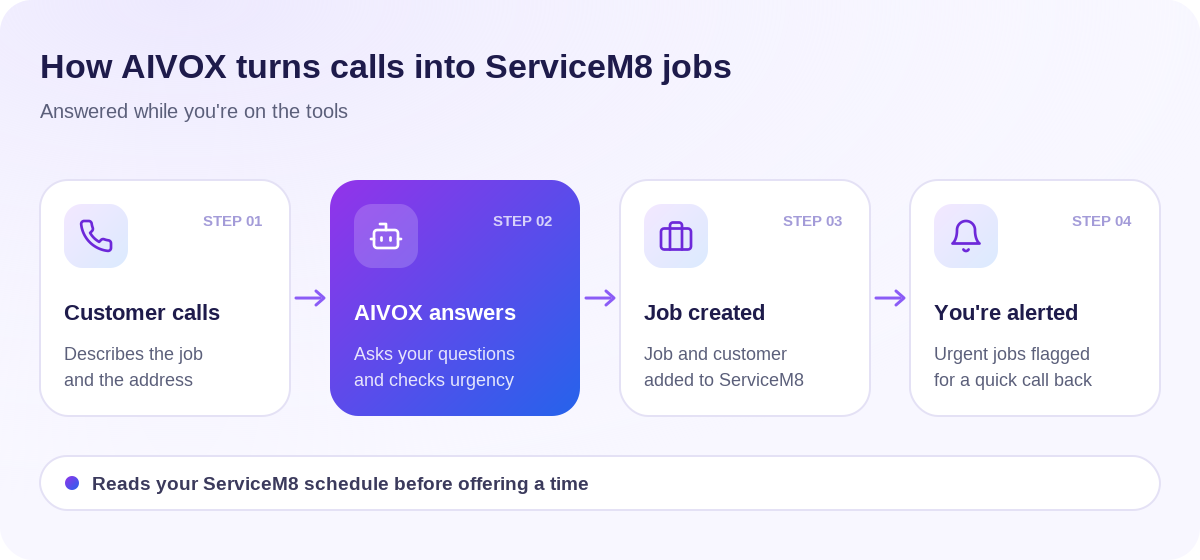
If you run your business in ServiceM8, every missed call is a job that never makes it onto your schedule. AIVOX is an answering service that books into ServiceM8: it picks up while you're on the tools, asks the questions you'd ask, and creates the job with the address, the problem and how urgent it is.
Because the ServiceM8 AI receptionist integration reads your schedule before offering a time, customers are only booked into gaps you actually have. Returning customers are matched to their existing record, new callers are added as customers, and urgent jobs are flagged so you can call back straight away.
It's built for Australian trade and service businesses, such as plumbers, electricians, HVAC technicians, cleaners and mobile mechanics, that need the phone answered without hiring a receptionist.
What it does
AIVOX and ServiceM8, working together
Jobs created automatically
Job details, address and urgency from the call are added to ServiceM8 as a new job.
Customer records synced
New callers are added as customers, and returning customers are matched to their existing record.
Schedule-aware booking
AIVOX reads your ServiceM8 schedule before offering a time, so jobs are never double-booked.
Reschedules and cancellations
Customers can move or cancel a booking over the phone and ServiceM8 stays up to date.
Example call
My hot water system has stopped working.
I can get someone out to you. What's the address, and is there any water leaking?
Setup
Connect ServiceM8 in three steps
Step 01
Connect ServiceM8
Link your ServiceM8 account from the AIVOX dashboard in a few clicks.
Step 02
Choose what AIVOX can book
Set the job types, service areas and hours AIVOX should book into.
Step 03
Get jobs, not voicemails
Every enquiry arrives in ServiceM8 as a job with the details you need.
Your data and privacy
Your data stays yours
Optional and opt-in
AIVOX only accesses ServiceM8 if you connect it from your dashboard.
Only what’s needed
AIVOX uses ServiceM8 only for the bookings, contacts and jobs it handles for you.
Never used for AI training
Your ServiceM8 data is never used to train AI models, by us or by any provider we use.
Disconnect any time
From your AIVOX dashboard or your ServiceM8 account.
Common questions
Which plan includes the ServiceM8 integration?
ServiceM8 is included on the Professional plan and the Business plan.
Do I need to change how I use ServiceM8?
No. Jobs and customers created by AIVOX look like any others in ServiceM8, so your team keeps working the way it does now.
Will AIVOX create duplicate customers?
No. AIVOX matches returning callers to their existing ServiceM8 customer record before creating a new one.
Can AIVOX tell an emergency from a routine job?
Yes. You set the rules for what counts as urgent, and AIVOX flags those jobs and alerts you straight away.
What does AIVOX do with my ServiceM8 data?
AIVOX only uses it to check availability and manage the bookings, contacts or jobs it handles for you. It doesn’t share your other records with AI services. Your data is never sold, never used for advertising and never used to train AI models. You can disconnect any time.
More integrations
Explore other integrations
Ready to never miss a call again?
Start your 7-day free trial and see what AIVOX can do for your business.
ServiceM8 is a trademark of its respective owner.