

Google Calendar integration
AI receptionist bookings, straight into Google Calendar
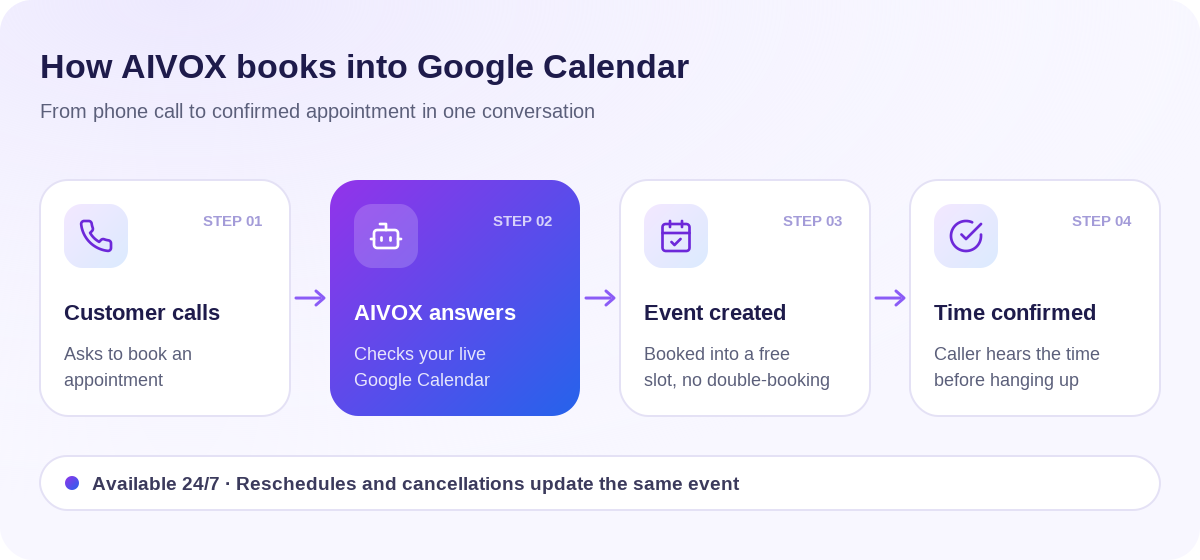
AIVOX checks your real availability before offering a time, then books the appointment into Google Calendar while the caller is still on the line.
Overview
An AI receptionist with Google Calendar booking
Most small businesses lose bookings in the gap between the phone ringing and someone checking the calendar. AIVOX closes that gap. It's an AI voice agent with Google Calendar access, so when a caller asks for an appointment it checks your real availability, offers times that are actually free and books the one they choose while they're still on the line.
That makes AIVOX a 24/7 AI receptionist for Google Calendar: automated appointment booking that keeps working after hours, on weekends and while you're with a customer. Each booking lands in your calendar with the caller's details, and reschedules or cancellations update the same event, so your day always matches what callers have agreed to.
Unlike standalone scheduling software, there's no booking link to send and nothing for the caller to fill in. It suits any small business that already runs its diary in Google Calendar, from clinics and consultants to tradies and tutors.
What it does
AIVOX and Google Calendar, working together
Real-time availability
AIVOX reads your calendar before every booking, so it only offers times you're actually free.
Instant bookings
New appointments appear in your Google Calendar the moment the call ends, with the caller's details attached.
Reschedules and cancellations
Callers can move or cancel a booking and your calendar updates automatically.
No double-bookings
Because availability is checked live, two callers can never be given the same slot.
Example call
Can I come in on Thursday afternoon?
I have 2pm or 3:30pm free on Thursday. Which would you like?
Setup
Connect Google Calendar in three steps
Step 01
Connect your calendar
Connect your Google account from the AIVOX dashboard and choose the calendar to book into.
Step 02
Set your booking rules
Tell AIVOX which appointment types you offer and how long each one takes.
Step 03
Let AIVOX book
Callers get a time that suits them, and the booking lands in your calendar.
Your data and privacy
Your data stays yours
Optional and opt-in
AIVOX only accesses Google Calendar if you connect it from your dashboard.
Only what’s needed
AIVOX uses Google Calendar only for the bookings, contacts and jobs it handles for you.
Never used for AI training
Your Google Calendar data is never used to train AI models, by us or by any provider we use.
Disconnect any time
From your AIVOX dashboard or your Google Calendar account.
AIVOX’s use and transfer of information received from Google APIs will adhere to the Google API Services User Data Policy, including the Limited Use requirements.
How we handle data from connected integrationsPopular with
Built for businesses that run on Google Calendar
Common questions
Which plan includes the Google Calendar integration?
Google Calendar is included on the Essential plan and every plan above it.
Can AIVOX book into more than one calendar?
Yes. You choose which calendar AIVOX books into when you connect your Google account, and you can change it any time from the dashboard.
Does AIVOX work as automated appointment booking software?
Yes, for phone bookings. Instead of sending callers a booking link, AIVOX talks to them, checks your Google Calendar and books the appointment during the call, 24/7.
What happens if I block out time manually?
AIVOX reads your calendar live, so anything you add yourself is treated as unavailable straight away.
What does AIVOX do with my Google Calendar data?
AIVOX only uses it to check availability and manage the bookings, contacts or jobs it handles for you. It doesn’t share your other records with AI services. Your data is never sold, never used for advertising and never used to train AI models. You can disconnect any time.
More integrations
Explore other integrations
Ready to never miss a call again?
Start your 7-day free trial and see what AIVOX can do for your business.
Google Calendar is a trademark of its respective owner.